Hardening update to Microsoft Entra Connect Sync AD FS and PingFederate configuration

Microsoft released new versions (2.4.xx.0) of Microsoft Entra Connect Sync last month – October 2024, and advising all customers are required to upgrade to the minimum versions by April 7, 2025.

The expected impacts from not upgrading are as follows:

  • Configuration of AD FS scenarios through the Connect Sync wizard may not work
  • Configuration of PingFederate scenarios through the Connect Sync wizard may not work

So if you are configuring AD FS or using PingFederate – this looks like something to look into.

Upgrading Entra Connect (won’t auto upgrade!)

The minimum versions required to avoid the impact are as follows:

  • Customers in commercial clouds: 2.4.18.0 or higher.
  • Customers in non-commercial clouds: 2.4.21.0 or higher.

If you are a customer in non-commercial clouds, 2.4.18.0 won’t do as it looks like 2.4.21.0 contains a bug fix specifically for non-commercial clouds.
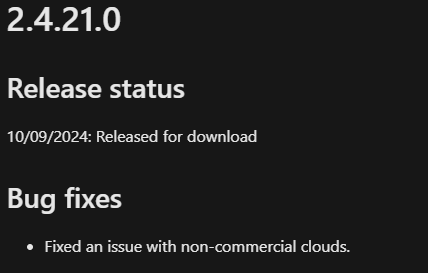
The documentation mentions the below on the automatic upgrade, however I do not find this to be accurate for these two specific versions.

When you check the ‘Release status’ of versions 2.4.21.0 and 2.4.18.0 on Microsoft Entra Connect version history, you will find that these two versions have been ‘Released for download’, rather than ‘Released for download and autoupgrade’.
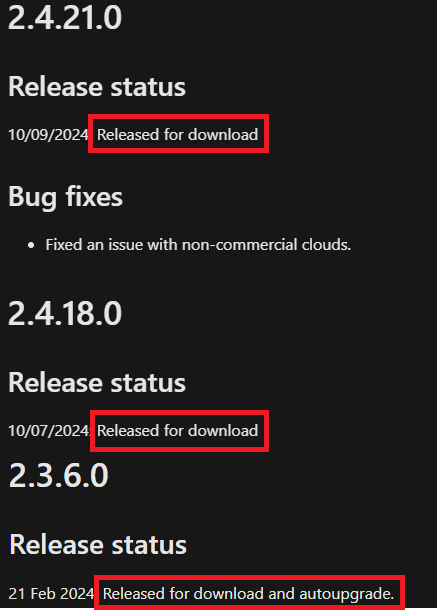
Hence I believe a manual download and upgrade will need to be performed, and prior to upgrading, you will also need to ensure you meet the below minimum requirements for the versions:

  • .NET 4.7.2
  • TLS 1.2

Conclusion

I’ve since then committed a change to the documentation Hardening update to Microsoft Entra Connect Sync AD FS and PingFederate configuration.

You can also consider moving to Microsoft Entra Cloud instead of Entra Connect Sync as mentioned in the documentation. A good comparison between Entra Connect and cloud sync is available on What is Microsoft Entra Cloud Sync?.

If your organisation configures AD FS or PingFederate via Entra Connect – why not act now?

Principle of Least Privilege? – Assign a user to an access package with PowerShell

I recently had to write up a PowerShell script for requesting assignment for access packages for a client where they wanted the access packages to be ‘hidden’ and all requests be submitted via their dedicated ITSM tool’s Self Service Portal.

As I was referencing Microsoft Learn – View, add, and remove assignments for an access package in entitlement management – Microsoft Entra – Microsoft Entra ID Governance | Microsoft Learn – I came across the below which made me think…”uh.. ReadWrite.All definitely sounds too much!”

All my script needed to do was to submit an assignment request, and NOT create/modify/delete any access packages.

What do I (or the script) need?

  • Look up the id of the access package based on the name of the access package received from the ticket.
  • Look up the id of the assignment policy with a dedicated naming convention. (example: ‘ITSM Submission’)
  • Submit the access package assignment request, make sure it goes through the approvals configured in the dedicated assignment policy.

So I absolutely did not need all the permissions under ‘EntitlementManagement.ReadWrite.All’.

What I did

What I did is pretty simple:

  • EntitlementManagement.Read.All‘ permissions instead of ‘EntitlementManagement.ReadWrite.All
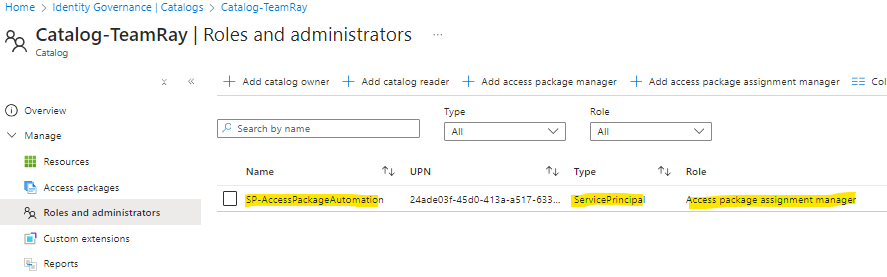
  • AND – assign the ‘Access package assignment manager‘ role to the service principal under the catalog we want to automate the assignment request submissions for.

One could argue that it potentially creates more administrative overhead – i.e. the service principal would have to be added the ‘access package assignment manager’ role for future Catalogs created.

But for what my script needs to do.. this is the ‘least privilege’ it needs. (and now I have the option to further manage which Catalogs the service principal can submit the assignment requests for the access packages under them!)

Admin assignments & approval setting

One thing I struggled for a bit was making sure the submitted assignment request goes through the approval settings configured in the assignment policy.

It kept skipping the approval steps when the ‘requestType’ was ‘AdminAdd’, no matter what I tried in the payload – and this certainly wasn’t what I needed.

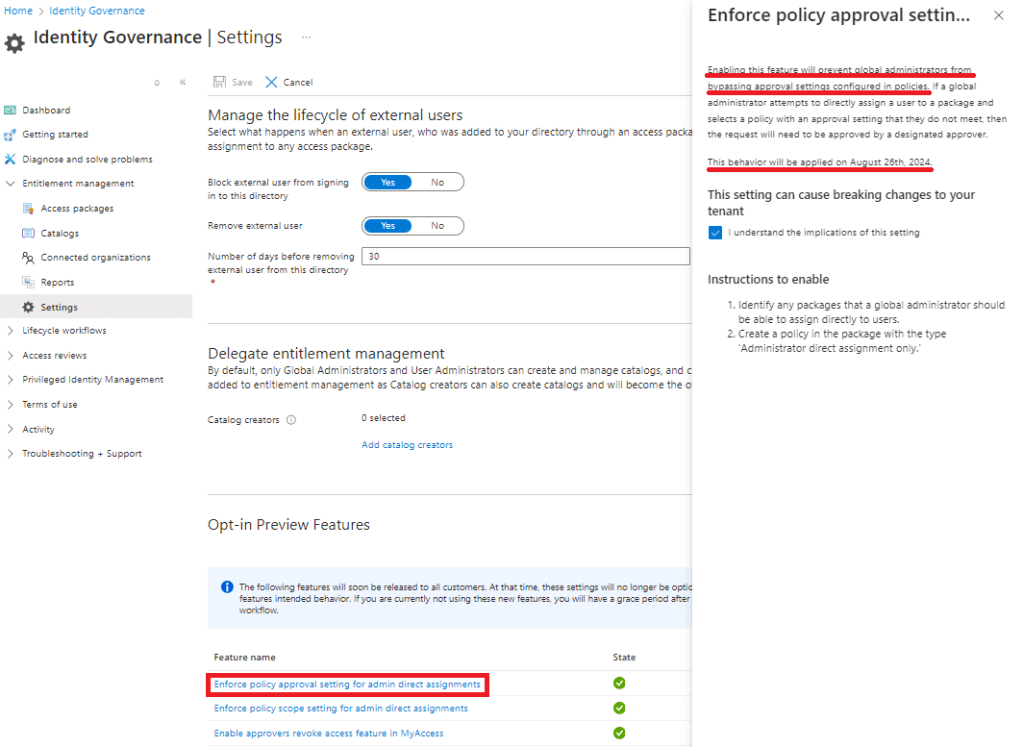
Then I eventually found out the ‘Enforce policy approval settings for admin direct assignments’ setting was not enabled on my dev tenant. It seems this setting was supposed to be applied on the 26th August 2024, but I had to manually enable it.

Further thoughts..

Principle of Least Privilege is crucial when it comes to assignment of privileged permissions/access. For starters, it reduces the attack surface and the damage from compromises.

In my case for example, if the service principal is compromised, all it can do is remove the assignments which would be easier to recover from, compared to all access packages being deleted.

But how do you ‘ensure’ least privilege? Does it have to rely on manual reviews which would rely on the reviewer’s knowledge and understanding of the privileges? Is there any systematic way to assess?

Less than 100 days left! – Changes to storage policies for unlicensed OneDrive accounts

Back in July 2024, Microsoft announced via Message Centre (Message ID: MC836942) on the changes to storage policies of unlicensed OneDrive accounts for business and enterprise customers.

The message states that they will begin rolling out late 2025 and expect to complete by late March 2025. (you can see the full message from https://mc.merill.net/message/MC836942)

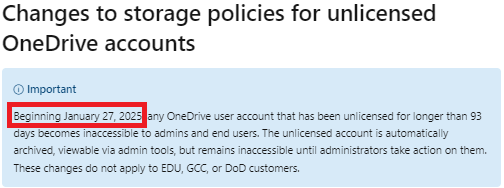
On Microsoft Learn – https://learn.microsoft.com/en-us/SharePoint/unlicensed-onedrive-accounts – you can also find the below ‘Important’ note.

I’ve seen multiple blog posts about this back in July/August – but now that there’s less than 100 days left till the 27th Jan 2025, I thought it’d be nice to bring it back to people’s attention.

Potential financial impact?

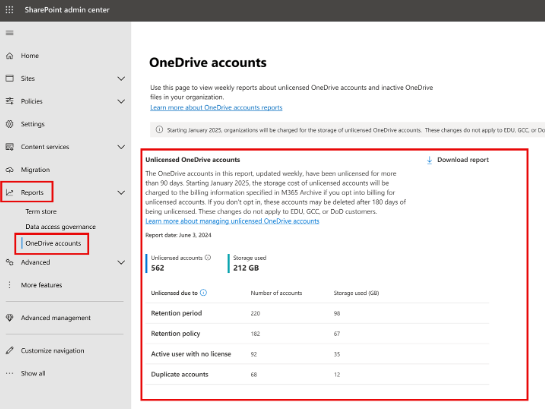
Admins can view a list of all the unlicensed OneDrive accounts and the storage used via the SharePoint admin centre > Reports > OneDrive accounts

As stated in MC836942, there is a fee of $0.05/GB/month to store unlicensed accounts in the Microsoft 365 Archive, so you can easily calculate the potential financial impact by looking at the ‘Storage used’ above.

One of the tenants I’ve seen had over 60TB under unlicensed accounts. So that’s over $3K per month or $36K per annum, or over $100K over 3 years…!

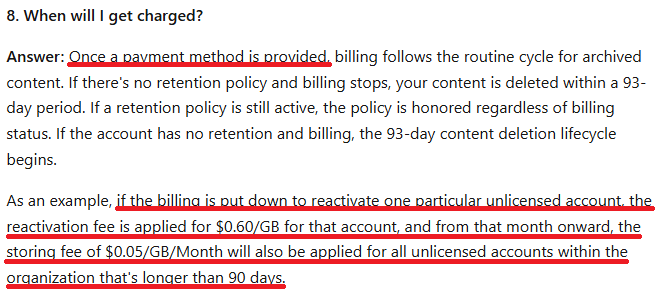
But you won’t start getting charged immediately from the 27th of January. (see below from the FAQ on Learn)

One might say – “Okay so I’ll never reactivate any OneDrive accounts!”.

But there’s always a returning employee, and unless you delete terminated user accounts (I’ve seen a lot of organisations that don’t) – it looks like a returning employee can be a trigger.

Even if you do delete the terminated user accounts – there’s always a ask to restore what they had from previous employment.

So what do I do?

Microsoft recommends that you take the following actions before January 27, 2025.

  1. Delete unlicensed accounts that you no longer wish to retain.
  2. Set up billing for accounts that you wish to retain.
  3. You may want to notify your users about this change and update any relevant documentation.

But I believe it is way more than just the above:

  • Some organisations might want to prepare new processes/policies around the reactivation of returning employees’ accounts.
  • There may be organisations wanting to look into a ‘charge-back’ model to the respective business units/departments.
  • Some may want to redefine their user offboarding process to ensure the user accounts are deleted upon termination – to prevent the impact from ‘automatic reactivation’ of the OneDrive accounts.
  • There may be orgnisations that applied x year retention policies on all OneDrive accounts, and need to revisit their strategy around it, starting with asking the question of ‘What do we really need to retain?’.

For an immediate action – I think it’s time to review and start doing a clean-up, unless your organisation has some legal/regulatory requirements preventing you from doing so.