I recently had to write up a PowerShell script for requesting assignment for access packages for a client where they wanted the access packages to be ‘hidden’ and all requests be submitted via their dedicated ITSM tool’s Self Service Portal.
As I was referencing Microsoft Learn – View, add, and remove assignments for an access package in entitlement management – Microsoft Entra – Microsoft Entra ID Governance | Microsoft Learn – I came across the below which made me think…”uh.. ReadWrite.All definitely sounds too much!”

All my script needed to do was to submit an assignment request, and NOT create/modify/delete any access packages.
What do I (or the script) need?
- Look up the id of the access package based on the name of the access package received from the ticket.
- Look up the id of the assignment policy with a dedicated naming convention. (example: ‘ITSM Submission’)
- Submit the access package assignment request, make sure it goes through the approvals configured in the dedicated assignment policy.
So I absolutely did not need all the permissions under ‘EntitlementManagement.ReadWrite.All’.
What I did
What I did is pretty simple:
- ‘EntitlementManagement.Read.All‘ permissions instead of ‘EntitlementManagement.ReadWrite.All‘
- AND – assign the ‘Access package assignment manager‘ role to the service principal under the catalog we want to automate the assignment request submissions for.
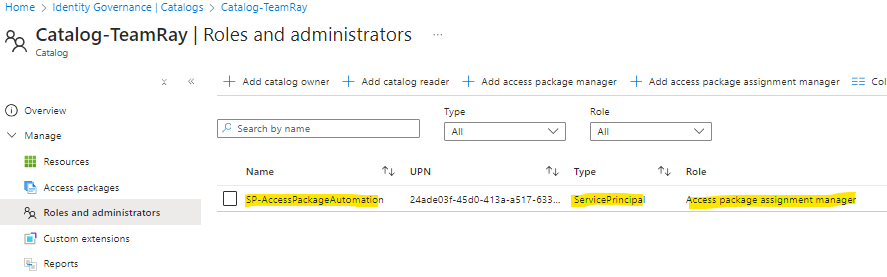
One could argue that it potentially creates more administrative overhead – i.e. the service principal would have to be added the ‘access package assignment manager’ role for future Catalogs created.
But for what my script needs to do.. this is the ‘least privilege’ it needs. (and now I have the option to further manage which Catalogs the service principal can submit the assignment requests for the access packages under them!)
Admin assignments & approval setting
One thing I struggled for a bit was making sure the submitted assignment request goes through the approval settings configured in the assignment policy.
It kept skipping the approval steps when the ‘requestType’ was ‘AdminAdd’, no matter what I tried in the payload – and this certainly wasn’t what I needed.
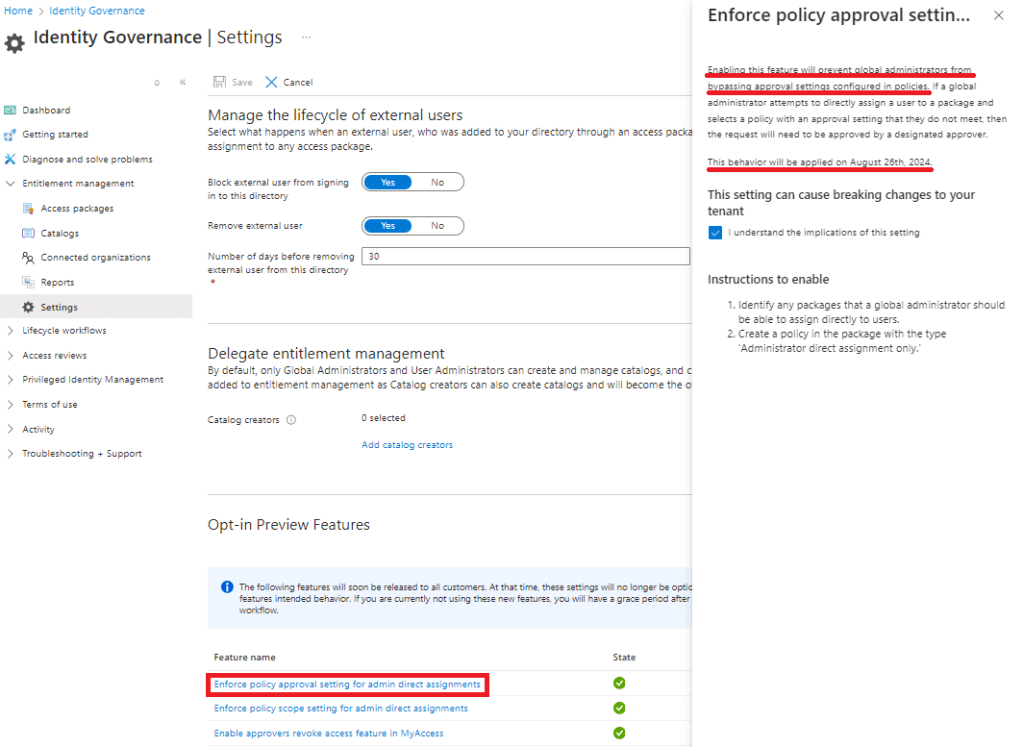
Then I eventually found out the ‘Enforce policy approval settings for admin direct assignments’ setting was not enabled on my dev tenant. It seems this setting was supposed to be applied on the 26th August 2024, but I had to manually enable it.
Further thoughts..
Principle of Least Privilege is crucial when it comes to assignment of privileged permissions/access. For starters, it reduces the attack surface and the damage from compromises.
In my case for example, if the service principal is compromised, all it can do is remove the assignments which would be easier to recover from, compared to all access packages being deleted.
But how do you ‘ensure’ least privilege? Does it have to rely on manual reviews which would rely on the reviewer’s knowledge and understanding of the privileges? Is there any systematic way to assess?
 iam-ray.com